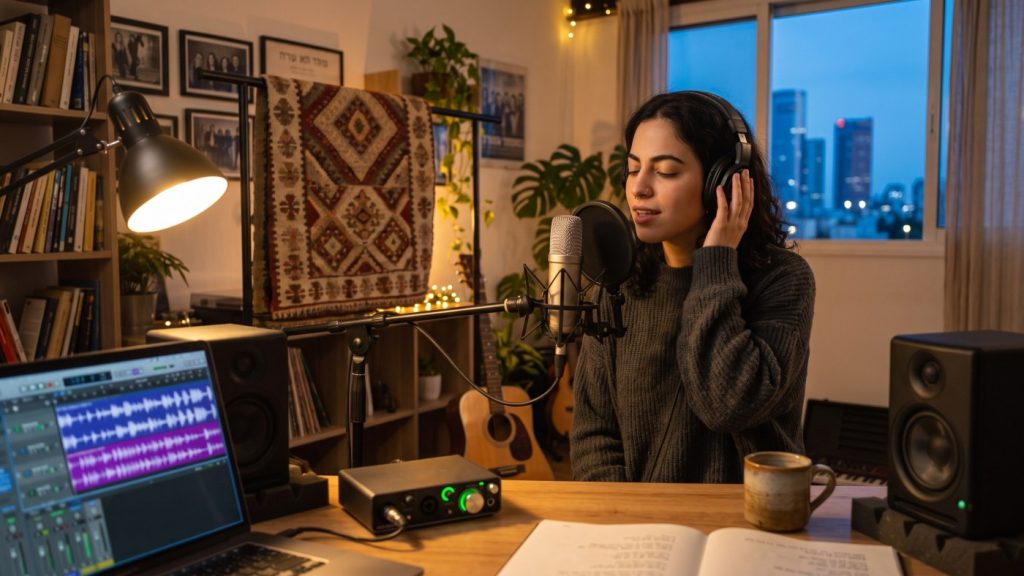
The song is finished, the chords sit right, and now you want to hear it properly – not as a phone voice memo with the air conditioner humming in the background. Good news: you don’t need a pro studio or tens of thousands of shekels. You need a little of the right gear, a room with a few simple fixes, and a handful of principles most beginners skip. Here’s what to buy, what to skip, and how to record vocals and guitar step by step – whether you’re in your first year of guitar lessons or already writing songs of your own.
We wrote it with North Tel Aviv apartments in mind: a study in Bavli, a kid’s bedroom in Hadar Yosef, a living room in Shikun Dan – ordinary rooms with hard walls, an AC unit and neighbors, not an isolated studio.
The essential gear: four things you actually need
The signal chain is simple: mic, interface, recording software, then headphones or monitors. Every link matters – but the most important one, surprisingly, is the room itself.
1. Audio interface
The interface connects your mic and instruments to the computer: a mic preamp, a Hi-Z input for guitar or bass, and outputs for headphones and monitors. Two inputs are plenty – enough for vocals and guitar at once. Popular choices: the Focusrite Scarlett 2i2, Audient iD4, SSL 2, Behringer UMC202HD and M-Audio AIR 192|4.
Make sure it has phantom power (48V) – without it, a condenser mic won’t work.
2. One good microphone: dynamic or condenser?
This is the question everyone asks, and the answer depends mostly on your room – and on your voice. A soft, breathy voice loves a condenser; a loud, belting voice sits happily on a dynamic. If you’re not sure which one you have, that’s exactly a question for a vocal coach.
- Dynamic mics (e.g. Shure SM58 or SM57) – less sensitive, picking up mainly what’s directly in front of them and much less of the room. Nearly indestructible, no phantom power needed. Ideal for untreated rooms, loud vocals and guitar amps.
- Condenser mics (e.g. Audio-Technica AT2020 or Rode NT1) – more sensitive, with more detail and “air” in the top end. Great for softer vocals and acoustic guitar, but they also capture room echo, the fridge and the street outside.
Rule of thumb: if your room is echoey and you have no plans to treat it, start with a dynamic. If you’re willing to do some basic acoustic treatment (see below), a condenser will give you a more open, detailed vocal and acoustic sound.
3. Closed-back headphones
For tracking you need closed-back headphones so the backing track doesn’t bleed into the mic. Reliable picks: Audio-Technica ATH-M50x, Sony MDR-7506, Beyerdynamic DT 770 Pro. Open-back headphones are more comfortable for mixing, but not suitable for recording vocals.
4. Studio monitors
Monitors aren’t meant to flatter your music – they’re meant to tell you the truth. Common 5-inch models: Yamaha HS5, JBL 305P MkII, KRK Rokit 5, PreSonus Eris. In a small room, 5-inch beats 8-inch – extra bass in an untreated room will only mislead you. On a tight budget, start with headphones alone and add monitors later.
Budget table: roughly what does it cost?
Prices below are approximate estimates only for new gear in Israel; they vary by shop, sales and exchange rates. Used gear can cost much less.
| Item | Approx. price range (₪) | Notes |
|---|---|---|
| 2-input audio interface | 450–1,000 | Check for phantom power and a Hi-Z input |
| Dynamic mic | 350–600 | SM58/SM57 and similar |
| Condenser mic | 400–1,100 | Requires 48V |
| Closed-back headphones | 350–750 | First thing to buy after the mic |
| Pair of 5″ monitors | 1,200–2,500 | Can wait for phase two |
| Stand, XLR cable, pop filter | 150–350 | Don’t buy the cheapest cable |
| Basic acoustic treatment | 0–600 | Blankets and a bookshelf – nearly free |
| Starter kit total (no monitors) | approx. 1,300–2,500 | Enough for very good recordings |
Free and affordable recording software (DAWs)
A DAW (Digital Audio Workstation) is where you record, edit and mix. Excellent options cost little or nothing:
- GarageBand – completely free on Mac, iPad and iPhone. Simple, with good amp simulations, and projects open in Logic Pro if you upgrade later.
- Reaper – for Windows and Mac. A full, professional DAW with a fully functional 60-day evaluation and an inexpensive personal licence (around $60). Very light on your computer and endlessly flexible, though the learning curve is a bit steeper.
- Cakewalk – for years, Cakewalk by BandLab was a full-featured free DAW for Windows. BandLab has since replaced it with new products, Cakewalk Sonar and Cakewalk Next, with a different pricing model – check the current terms on their site before you download.
- BandLab – a free studio in the browser and on mobile, good for sketches and remote collaboration.
- “Lite” versions – many interfaces ship with Ableton Live Lite or Pro Tools Intro, cut-down pro software that’s plenty to start with.
Don’t spend weeks choosing – the difference is workflow, not sound. Pick one and learn it properly.
Room treatment on a near-zero budget for a North Tel Aviv apartment
A bare room with hard walls and tiled floors – the standard Tel Aviv apartment – creates reflections that give every recording a hollow, “roomy” sound. That’s very hard to fix later. Here’s what to do:
- Thick blankets and duvets – hang them behind and around the singer, on a light stand or a clothes rack. The cheapest, most effective trick for vocals.
- An open wardrobe – singing into a closet full of clothes is basically a makeshift vocal booth.
- A full bookshelf – books of different depths scatter sound and break up echoes.
- A thick rug – cuts reflections from the floor.
- Sofa, cushions, heavy curtains – any soft furniture helps.
If you want to invest a bit more, 5–10 cm rockwool panels at the first reflection points (the side walls between your monitors and your ears) make a big difference. Thin “egg-crate” foam only tames high frequencies and does nothing for bass problems.
Placement
- Don’t record vocals right up against a wall or in a corner – move at least a metre away and put the blanket behind you.
- Set up your monitors and your head in an equilateral triangle, with the tweeters at ear height.
- Pull the monitors a few tens of centimetres off the back wall, and avoid sitting exactly halfway along the room’s length – bass tends to vanish or boom there.
Gain staging: the secret to clean recordings
Gain staging means setting the right level at every stage. Anything over 0 dBFS clips – distortion you can’t undo. Record too quietly, though, and you’ll raise the background noise when you turn it up later.
- Set your project to 24-bit and 44.1 or 48 kHz. At 24-bit there’s plenty of headroom, so there’s no need to push levels.
- Ask the singer to perform the loudest part of the song – not the quiet verse.
- Turn up the Gain knob on the interface until peaks land around -12 to -6 dBFS on the DAW meter.
- Leave a safety margin: singers always get louder on the real take than during the soundcheck.
- If the interface’s clip light goes red – turn it down. Always.
Tip: record with a low buffer size (64–128 samples) to avoid headphone latency; raise it to 512–1024 when mixing.
Recording vocals, step by step
- Warm up – at least 10 minutes before you start. For ideas, see our practical guide to breath support for singers – it doubles as a pre-take warm-up.
- Mic position – about 15–20 cm from your mouth (roughly a spread hand), with a pop filter in between. With a dynamic mic you can get closer, 5–10 cm.
- Height – mic at mouth level or slightly above, so your throat stays open and your head doesn’t drop.
- Headphone mix – the backing should feel comfortable, with enough of your own voice. If you can’t hear yourself, you’ll oversing and drift off pitch.
- Gain – follow the rules above.
- Record 3–5 full takes of the song before fixing individual sections. Full takes keep the emotion and flow.
- Comping – pick the best lines from each take and combine them into one. Every modern DAW supports this.
- Take breaks – after an hour of singing, your voice tires. Better to come back tomorrow than burn through takes.
Recording guitar, step by step
Acoustic guitar
- Tune up – and check again every few takes. New strings drift.
- Place a condenser 15–30 cm from the guitar, aimed roughly where the neck meets the body, around the 12th fret. Pointing straight at the soundhole gives you too much boomy bass.
- Sit on a sturdy, non-creaky chair, take off your watch and jewellery, and switch off the AC.
- Play the loudest part, set gain for -12 to -6 dBFS, and record.
Electric guitar
- Through an amp – an SM57 a few centimetres from the speaker grille. Aim at the centre of the cone for a brighter, sharper tone, or towards the edge for a rounder, warmer one. Move it a centimetre or two and listen – the difference is huge.
- Direct (DI) – plug straight into the interface’s Hi-Z input and use an amp simulator in your DAW. Silent, apartment-friendly, and you can change the tone later. If you use pedals, have a look at our beginner’s guide to guitar effects.
Record to a click – and if the click still throws you, work through some groove and metronome practice before you track. It feels restrictive at first, but it’s what lets you edit and build a song layer by layer.
Basic mixing tips
- Start with levels – before any plugin, balance the faders. That’s most of the mix.
- High-pass filter – cut low frequencies from every track that doesn’t need them. For vocals, usually around 80–100 Hz; for acoustic guitar in a full arrangement, sometimes higher.
- Subtractive EQ – cutting problem frequencies (the “mud” around 200–400 Hz) usually works better than boosting everything.
- Gentle compression – a 2:1 to 4:1 ratio with 3–6 dB of gain reduction on peaks is enough for most vocals.
- Reverb on a send – not a separate reverb on every track. That way everything sits in the same space.
- Reference tracks – compare your mix to a commercial song in a similar style, at matched loudness.
- Listen quietly and on several systems – at low volume, in mono, on headphones, in the car and on your phone.
- Take breaks – ears adjust quickly. Every 45–60 minutes, step away for a few minutes.
Common mistakes
- Buying gear before treating the room – an expensive mic in an echoey room records expensive echo. Blankets first, upgrades later.
- Recording too hot – “as close to red as possible” is a myth from the tape days. At 24-bit there’s no benefit to recording near 0 dBFS.
- “We’ll fix it in the mix” – bad pitch, AC noise, clipping and room echo are nearly impossible to fix. Fix them at the source – and for vocals, the source is the voice itself: pitch accuracy is built in singing lessons, not in a plugin.
- Open-back headphones while tracking – the backing track leaks into the mic and leaves a ghost of the song in your vocal track.
- Too many plugins – ten effects on every channel usually hurt more than they help.
- Endless mixing, too little playing – in the end, performance beats gear. An average recording of a great performance beats a perfect recording of a weak one.
Your first-week plan
| Day | Task | Time |
|---|---|---|
| 1 | Install your DAW and interface, set 24-bit / 48 kHz | 45 min |
| 2 | Basic acoustic treatment: blankets, rug, placement | 60 min |
| 3 | Gain practice: record 5 short clips and check your peaks | 30 min |
| 4 | Record guitar to a click (verse and chorus) | 45 min |
| 5 | Record 3–5 vocal takes and comp them | 60 min |
| 6 | Basic mix: levels, HPF, compression, reverb | 60 min |
| 7 | Listen on different systems and write a fix list | 30 min |
How we approach this at Rockstar in North Tel Aviv
Many Rockstar students arrive with songs of their own and want to hear them recorded. Our teachers are working musicians who record regularly themselves, so in guitar lessons in North Tel Aviv, in singing lessons and in our band and ensemble program we work on this side too: playing to a click, singing into a mic, and preparing a part so it sounds good on a recording. Often the biggest upgrade to a home recording isn’t gear – it’s the confidence and precision of the player. Our music school is in Ramat Aviv Gimel, a short drive from most North Tel Aviv neighborhoods, and with Rockstar Home a teacher can also come to you – subject to teacher availability – and work on your recordings in the very room where you track.
FAQ
Can I just record on my phone?
For sketches, absolutely. For a finished song, an interface and a proper mic are a big step up in level control and noise.
What should I buy first – monitors or headphones?
Closed-back headphones. You can’t record vocals without them, and in an untreated room monitors can mislead you. Add monitors in phase two.
Do I need a powerful computer?
Not really. A recent laptop with 8–16 GB of RAM handles dozens of tracks. If you hear clicks or dropouts, increase the buffer size.
How important is a pop filter?
Very – especially with a condenser. It stops the bursts of air on “p” and “b” sounds, and it’s one of the cheapest items with the biggest payoff.
What about mastering?
As a beginner, focus on a good mix. A gentle limiter at the end can bring you closer to commercial loudness, and for a song that really matters, send it to a mastering engineer.
Can I learn home recording with a teacher in North Tel Aviv?
Yes. You can take lessons at Rockstar music school in Ramat Aviv Gimel, a short drive from Hadar Yosef, Shikun Dan, Ramat HaHayal, Bavli and North Afeka (more about the school in our guide to music lessons in Ramat Aviv). If you’d rather work on your own setup, you can ask for a Rockstar Home lesson at your apartment, subject to teacher availability.
Free tools that help: tap tempo BPM counter · online metronome · chord transposer
Read also: How to write your first song · How to Mix Your First Song · Mic Technique for Singers · How to Solo Like David Gilmour · EQ in Mixing · Reverb in Mixing
Ensembles & bands · All lessons · Contact us · Book a free intro lesson